
Moving small files to Amazon S3 has been a harder-than-expected problem for two decades. Concurrency helps, and the AWS CLI's CRT-based connection pooling is a real improvement — but for files under a megabyte, especially from the edge, the overhead of TCP and TLS still dominates. You spend more time on connection setup than on actually transferring data.
Our founder Lee Harding built raptor to show that there's a better path: RaptorQ forward error correction
encoded over UDP, protected with WireGuard encryption. The result is a cross-platform native CLI that
sends small files to S3 faster than the standard AWS CLI — with comparable security and no
dependencies -- and with 10x less CPU time. We released it as open source last week under the MIT license.
Why HTTPS Falls Short for Small Files
For large files, HTTPS performs well. You pay the connection setup cost once, and the actual data transfer dominates the total time. But for small files — and a significant fraction of real-world S3 workloads are small files — setup cost is everything.
A TCP connection starts slow. The slow-start algorithm begins with a small congestion window that ramps up over several round trips before reaching the available bandwidth. For a 1 KB file from an edge location, the connection might never reach full speed before the transfer is done. Add TLS negotiation on top — another one to two round trips — and you've spent most of your time on ceremony rather than work.
Even a native S3 API client written in Go or C# (bypassing the Python startup cost of the AWS CLI) doesn't fundamentally change this picture. Wall-clock times improve, but CPU time stays high: the TLS stack, HTTP encoding, header processing, and connection state management are all still doing their full amount of work for every single file.
RaptorQ: Reliable Delivery Without Round-Trip Acknowledgements
UDP has no built-in reliability or ordering, and the common misconception is that this makes it unsuitable for file transfers. In reality, "reliability" doesn't have to mean "wait for an ACK." It just means the receiver ends up with all the data. RaptorQ achieves that differently: it sends enough information that the receiver can reconstruct the original content even if some packets are lost or arrive out of order — no round trip required.
Concretely, raptor encodes each file into two categories of packets:
- Source packets — chunks of the original file content, in sequence.
- Repair packets — additional mathematically-derived data that can substitute for any missing source packets.
If all the source packets arrive, reassembly is trivial — just stitch them together in order. If some are lost, the receiver can use a mix of source and repair packets to reconstruct the original. The math behind this (erasure coding based on a sparse-matrix XOR fountain code) is the same technology used for reliable satellite data delivery and broadcast distribution. It works, and it works under significant packet loss.
This means raptor doesn't need to wait for a round-trip acknowledgement before
considering a file "sent." It fires the packets and moves on. For bursty edge-to-cloud workloads
with many small files, this changes the character of the problem entirely.
WireGuard for Encryption: No TLS Required
UDP doesn't include encryption by design — that responsibility belongs to the application, which means
you choose exactly the right level of protection for your workload rather than inheriting a
one-size-fits-all stack. raptor uses WireGuard's cryptographic protocol directly — not
as a VPN tunnel, but as a lightweight encryption layer applied to each UDP datagram.
WireGuard uses the Noise Protocol Framework for key exchange and ChaCha20-Poly1305 for authenticated encryption. The key properties that make it well-suited here:
- Stateless — no TLS session to maintain. If the session expires or the connection breaks, the next send silently triggers a fresh handshake. No reconnect logic to write.
- No PKI — authentication is based on pre-shared public keys. No certificate authority, no certificate rotation, no chain validation at runtime.
- Fixed cryptographic choices — nothing to misconfigure. The cipher suite is specified by the protocol, not negotiated per connection.
- Compact — the WireGuard overhead per packet is small, which matters when your payload is only a few hundred bytes.
The encryption is provided by our wg-client library (also MIT-licensed), which implements the
WireGuard protocol as a .NET UdpClient-compatible interface. The raptor
CLI is built on top of it.
The Backend: Serverless, of Course
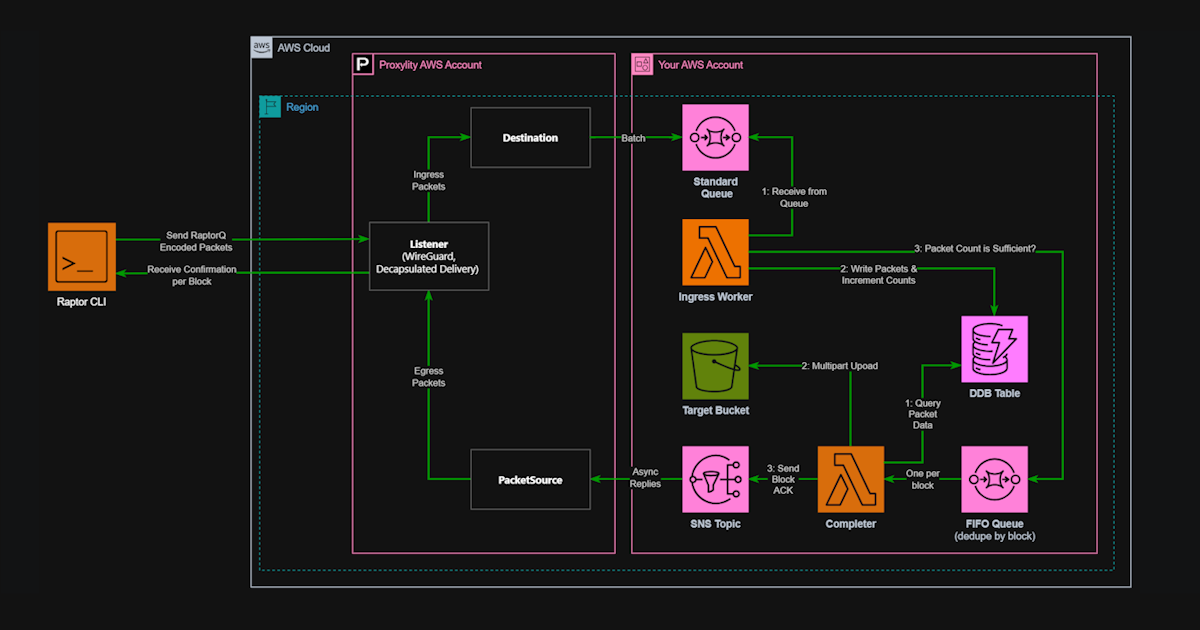
The CLI is only one half of the system. On the receiving end, raptor uses a Proxylity
UDP Gateway WireGuard Listener to accept the encrypted datagrams, strip the WireGuard framing, and
route the inner RaptorQ packets to a Lambda function. The Lambda collects packets for each file
transfer, and once a sufficient number have arrived — enough for RaptorQ to reconstruct the full
content — writes the assembled file to S3.
The backend is fully serverless. There are no persistent processes, no long-running receivers, and no coordination infrastructure. Lambda functions spin up as packets arrive and write directly to S3. The CloudFormation templates to deploy the entire backend are included in the raptor repository.
What the Numbers Look Like
For a 1 KB file upload, here's what the three approaches deliver on a test machine:
$ time aws s3 cp data/1kb/file_1.bin s3://${BUCKET}/test/ --quiet
real    0m0.720s
user    0m0.593s
sys     0m0.070s

$ time ./s3upload data/1kb/file_1.bin s3://${BUCKET}/test/
real    0m0.327s
user    0m0.136s
sys     0m0.062s

$ time ./raptor data/1kb/file_1.bin wg://${RAPTOR_ENDPOINT} \
    --server-key ${RAPTOR_SERVER_KEY} --client-key ${RAPTOR_CLIENT_KEY} --silent
real    0m0.303s
user    0m0.013s
sys     0m0.014s
Wall-clock time is somewhat faster between the native HTTPS client and raptor for a single
file on a low-latency connection — but CPU time is roughly 10x lower. That gap compounds at scale.
At 200 million requests per second (S3's reported throughput), the difference in CPU energy
consumed is staggering.
The advantage shifts more decisively toward raptor on high-latency or lossy connections.
Weak Wi-Fi, cellular IoT, satellite links, intercontinental transfers — these are exactly the
conditions where TCP slow-start, lost packet retransmission, and TLS negotiation hurt most, and where RaptorQ's ability to
reconstruct files from a subset of packets with no ACK round trip makes the biggest difference.
What "Small" Means
The crossover point depends on network conditions. On a low-latency LAN, raptor's
advantage shrinks to CPU efficiency alone — wall-clock times converge. On an intercontinental
connection with 150 ms latency, the RaptorQ approach wins clearly even for files well above 1 MB.
A practical rule: if your use case involves files below 100 KB on any connection, or files below
1 MB on a high-latency or lossy link, raptor will outperform the HTTPS path
meaningfully. For large files on a fast LAN, using the AWS API with CRT is the right call.
Rate Limiting and Acknowledgement Control
One advantage of owning the transport is controlling it. raptor includes two options
that aren't available at all via the standard S3 API:
--rate-mbps— cap the sending rate to a specific bandwidth. Important for shared networks and IoT deployments where saturating the link would affect other traffic. Because UDP hands congestion control to the application,raptorexposes it as a first-class option rather than hiding it behind opaque heuristics.--confirm NONE— skip waiting for transfer confirmation. For use cases where the application will verify the upload out of band, or where the cost of a round trip to confirm outweighs the benefit, the CLI can fire and move on immediately.
These aren't niche features. Edge computing and IoT workloads regularly involve constrained bandwidth, shared radio links, and workflows where fire-and-verify is the natural pattern.
Open Source Under MIT
The complete system — CLI, backend Lambda, CloudFormation templates, and the underlying wg-client WireGuard library — is open source under the MIT license at github.com/proxylity/raptor.
The CLI is written in C# with .NET 10 ahead-of-time (AOT) compilation, producing a native single-file executable around 3.5 MB with no runtime dependencies. The same codebase produces binaries for Linux and Windows.
We built raptor partly to validate ideas, partly to demonstrate what Proxylity UDP
Gateway makes possible as a backend, and partly because the problem of small file transfers at the
edge is genuinely unsolved in the standard toolchain. We hope it's useful. Feedback, issues, and
pull requests are welcome.